Ready to Work Together?
Let's discuss how our expertise can help transform your business.


 Mar 19, 2026
Stop reading raw Cost Explorer graphs. Let Claude write your FinOps briefing.
Every Monday morning, someone on your team opens AWS Cost Explorer, squints at a bar chart, and tries to figure out why the bill went up. They spend 20 minutes clicking through service breakdowns, correlating dates with deployments, and writing a Slack message that says something like: "EC2 is up this week, probably the new EKS nodes."
That process is manual, inconsistent, and usually incomplete. The person doing it has to hold a lot of context in their head. They need to know which deployments happened, which teams changed what, what the baseline looks like. And if they're wrong about the root cause, no one catches it until the next month's bill.
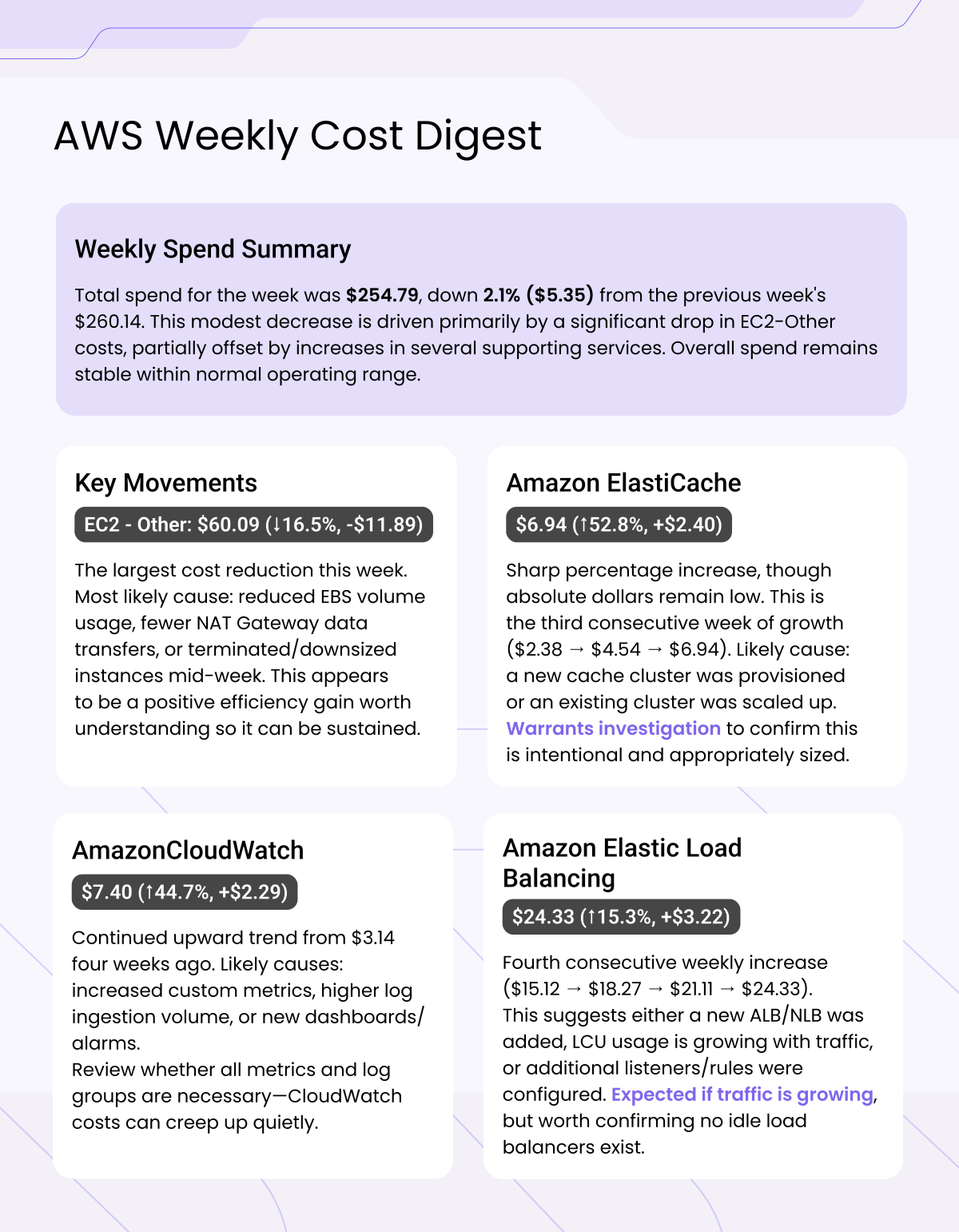
We built a script that automates this entirely. It pulls 4 weeks of cost data from AWS Cost Explorer, feeds it to Claude with a FinOps-focused prompt, and produces a clear digest every Monday morning, complete with root cause hypotheses, anomaly flags, and recommended actions.
Engineering teams running this report save 30-60 minutes of manual analysis per week and catch cost anomalies 5-7 days earlier than they would through manual review.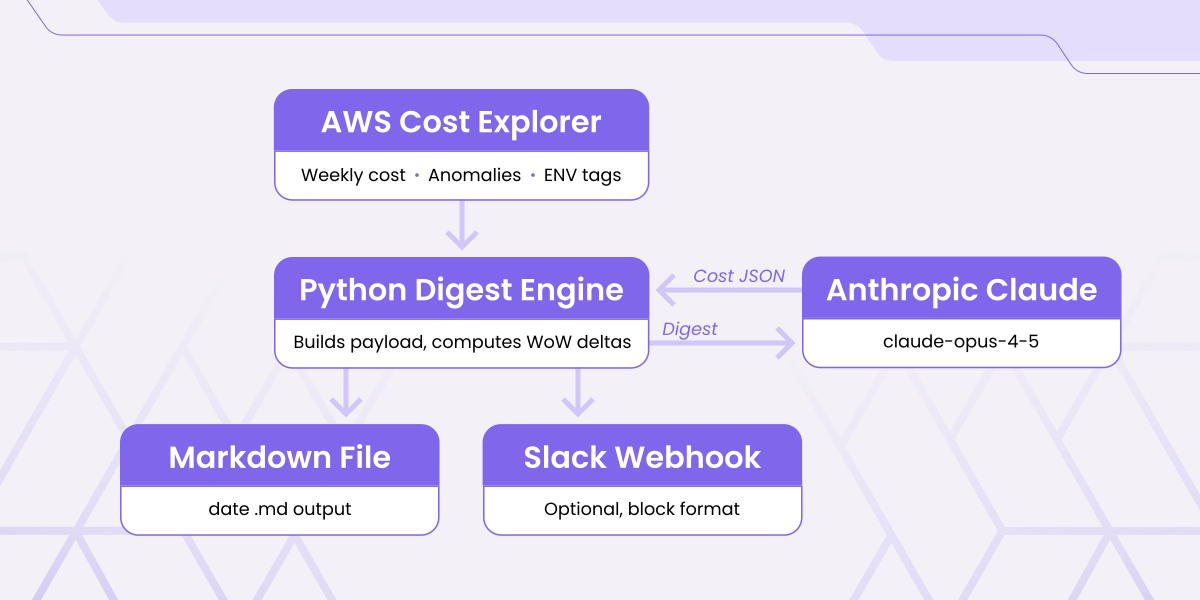
At a high level, the pipeline looks like this:
AWS Cost Explorer API > Python script > Claude API > Markdown digest (Slack)
Each weekly run does five things:
We use boto3 to call the AWS Cost Explorer API. The core function pulls cost grouped by service for any date range:
We run this function across four weekly windows to build a trend, then compute week-over-week deltas for every service. Anything below $5 is filtered out as noise.
Note: Cost Explorer data has a 24-48 hour lag. Running this on Monday morning gives you clean data through the end of last week, which is why the GitLab schedule fires at 08:00 UTC on Mondays.
AWS Cost Anomaly Detection is a free service that runs statistical anomaly detection on your spend in the background. Most teams never look at it. We pull it programmatically and feed it into the digest:
Each anomaly includes the affected service, region, dollar impact, and detection date — all of which goes into the prompt
This is the most important part. Rather than sending raw API responses to Claude, we assemble a clean JSON payload with pre-computed deltas.
The payload includes:
Pre-computing deltas in Python rather than asking Claude to calculate them from raw numbers produces more reliable, consistent output.
The system prompt is where most of the value lives. We instruct Claude to behave as a senior FinOps engineer, not a data summarizer:
The "avoid hedging" instruction is critical. Without it, Claude tends to write things like "this could potentially be related to..." which is useless for an engineering team. We want a concrete hypothesis, even if it's wrong. A wrong hypothesis that someone can validate is more useful than a non-answer.
Prompt tip: "Do not hallucinate services or numbers not present in the data" is an explicit guardrail. Without it, Claude occasionally invents plausible-sounding but fabricated explanations for cost movements.
The digest is saved as a dated Markdown file. If SLACK_WEBHOOK_URL is set, it's posted automatically. In GitLab CI, it's saved as a pipeline artifact with a 90-day retention window giving you a searchable archive of every weekly digest.
Manual cost review typically happens once a week at best, often once a month. Automated digests running every Monday mean anomalies are surfaced within days of occurring, not weeks. At enterprise cloud spend levels ($50k+/month), catching a misconfiguration a week earlier routinely saves thousands of dollars.
Human reviewers have good weeks and bad weeks. They miss things when they're busy, focus on the services they know best, and skip the "boring" ones. Claude reviews every service, every week, with the same level of attention.
This is the feature that surprises people most. Raw cost data tells you what changed. The LLM layer hypothesizes why. "EC2 up 34%" becomes "likely tied to your EKS node group scale-out on Tuesday, check whether your HPA scale-down trigger is configured." That hypothesis takes an engineer from an hour of investigation to a 5-minute confirmation.
Finance teams, engineering managers, and CTOs all need cost visibility but none of them want to read Cost Explorer graphs. A plain digest that arrives in Slack on Monday morning becomes a shared artifact that the whole organization can act on.
Prerequisites
Local run
The repo includes a .gitlab-ci.yml that runs every Monday at 08:00 UTC. Add your credentials as masked CI/CD variables, create a pipeline schedule, and you're done.
A few directions worth exploring depending on your environment:
 DevOps
Learn how to add Grafana observability to any AWS Fargate service using a Grafana Alloy sidecar and a single Terraform module block — CPU, memory, network, and trace signals flowing in under five minutes.
 Aru Shanmugam
·
Jun 3, 2026
Aru Shanmugam
·
Jun 3, 2026
 Digital Transformation
The question is no longer 'should we adopt generative AI?' It's two portfolio decisions most engineering leaders aren't yet structured to answer. A 2026 framework for substrate choices and lane sequencing on AWS with Claude.
Aru Shanmugam
·
May 20, 2026
 DevOps
Someone set that up manually a while back. Sound familiar? Here's how NextLink Labs uses Claude Code's agentic loop to import hand-built AWS infrastructure into Terraform — compressing a multi-day job into an afternoon.
Alex Podobnik
·
Apr 24, 2026
 DevOps
Most LLM-generated Terraform is bad — not because of the tool, but because of the prompt. Here's how NextLink Labs uses Claude Code and CLAUDE.md conventions to generate Terraform modules that are close to merge-ready.
Alex Podobnik
·
Apr 24, 2026